
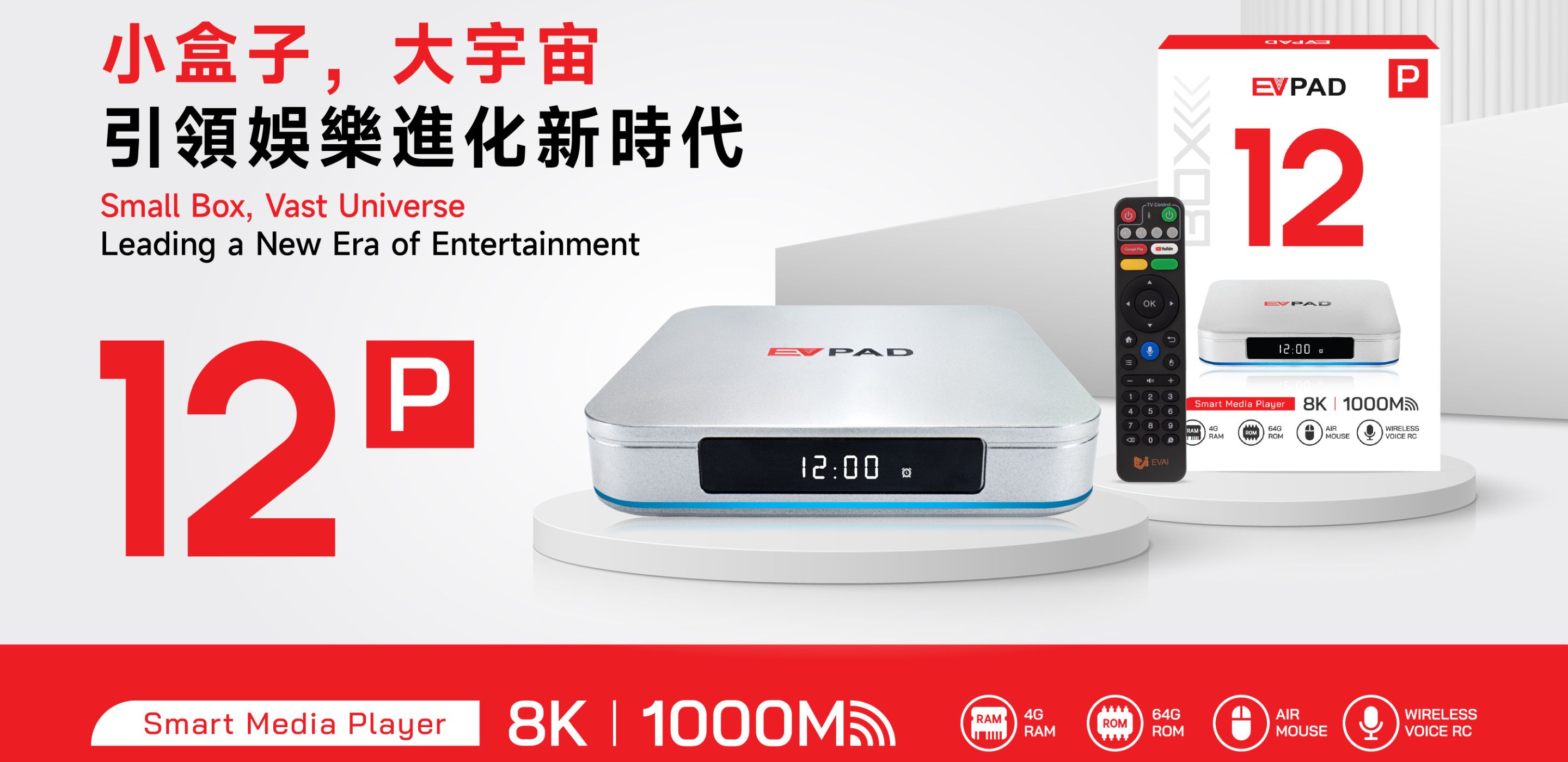
Quick verdict: The EVPAD 12P is a practical choice for buyers who want an EVPAD TV box with 4GB RAM, 64GB storage, Wi-Fi 6, Gigabit Ethernet, HDMI connectivity and a voice remote. Its strongest points are network flexibility, useful storage capacity and straightforward home setup. Before ordering, buyers should still confirm their plug type, television connection, delivery destination and the terms of any third-party services they plan to use.
This EVPAD 12P review focuses on confirmed hardware, everyday setup and realistic buying considerations. It does not evaluate the device by the number of channels, movies or third-party services it may access. Availability, pricing and subscription terms for compatible services are controlled by their respective providers and may vary by country.
EVPAD 12P Specifications at a Glance
| Memory | 4GB RAM |
|---|---|
| Storage | 64GB internal storage |
| Wireless Network | Wi-Fi 6 |
| Wired Network | Gigabit Ethernet |
| TV Connection | HDMI |
| Power Connection | Type-C power connection |
| Remote | Voice remote with air-mouse functionality |
| Display Capability | Output up to 8K; actual quality depends on the complete setup |
| Available Plug Options | US, UK, EU and AU options may be available |
Specifications and package details can change. Check the current EVPAD 12P product page before ordering.
What This Review Evaluates
A useful product review should separate confirmed features from marketing language. For that reason, this article evaluates the EVPAD 12P in six practical areas:
- Whether its memory and storage suit normal TV-box use
- How its Wi-Fi and Ethernet options fit different homes
- What is required to connect it to a television
- How the voice remote affects everyday navigation
- Which limitations buyers should understand
- What to verify before placing an order
This is not a laboratory benchmark, and it does not make unsupported claims about processor performance or unverified software versions.
Design and Home Setup
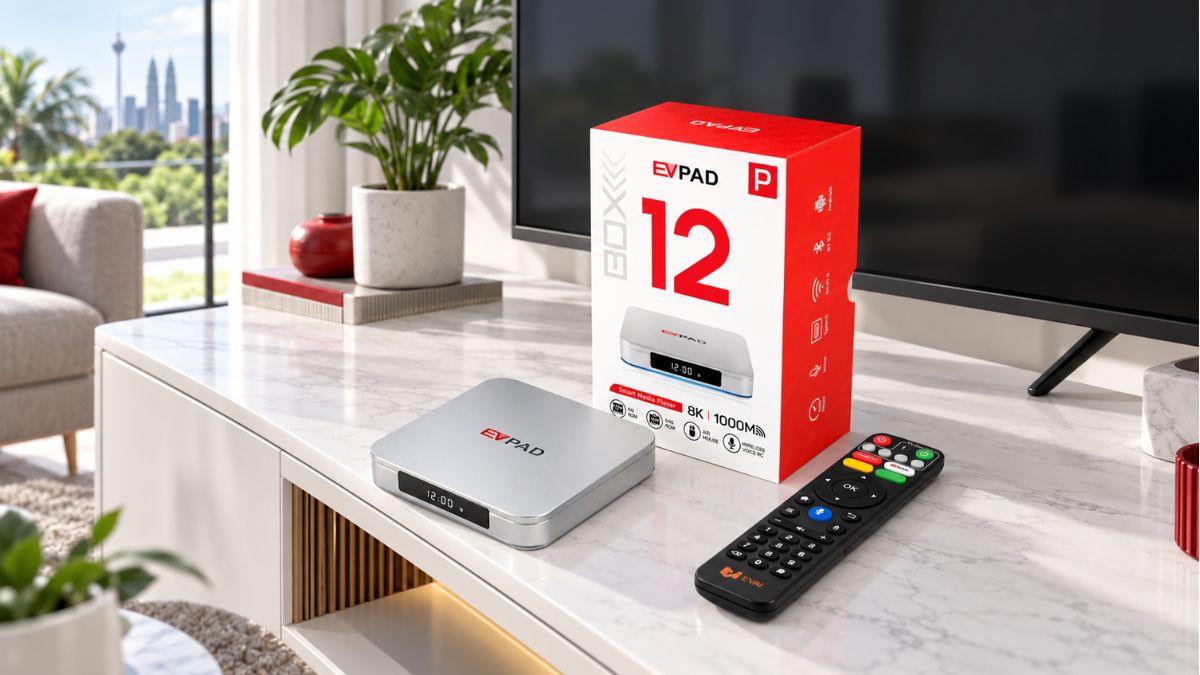
The EVPAD 12P uses a compact TV-box design that can be placed beside a television, inside a ventilated media cabinet or near a home router. Its silver finish and front display give it a clean appearance without requiring much space.
Placement still matters. Keep enough space around the device for ventilation, avoid covering it with other equipment and make sure the HDMI and power cables are not under tension. If you plan to use Ethernet, position the box where the network cable can reach without creating a tripping hazard.
Connections You Will Use Most
- HDMI: Connects the EVPAD 12P to a compatible television or display.
- Gigabit Ethernet: Provides a wired network option when stable Wi-Fi is difficult to maintain.
- Wi-Fi 6: Provides wireless connectivity with a compatible router.
- Type-C power: Supplies power through the correct included adapter.

4GB RAM and 64GB Storage: What They Mean in Practice
The EVPAD 12P is listed with 4GB RAM and 64GB of internal storage. These figures are useful, but they describe different parts of the device.
4GB RAM
RAM supports the system while menus, settings and compatible applications are running. Having 4GB gives the device more working memory than basic configurations with smaller memory capacity. Actual responsiveness still depends on software condition, background activity, available storage and the applications being used.
64GB Storage
Internal storage is used by the operating system, updates, settings and installed applications. The amount shown as available after startup will be lower than the advertised 64GB because part of the capacity is reserved for system files.
Buyers should not treat 64GB as unlimited storage. Removing unused files and applications can help maintain sufficient free space for normal operation and future updates.
Wi-Fi 6 or Gigabit Ethernet?
One of the EVPAD 12P's most useful hardware features is the choice between Wi-Fi 6 and Gigabit Ethernet. Neither option is automatically best for every home.
Choose Wi-Fi When
- The router provides a strong signal near the television
- Running a network cable is inconvenient
- The home network is not heavily affected by walls or interference
- You want more flexibility when positioning the TV box
Choose Ethernet When
- The television area has access to a network cable
- The Wi-Fi signal is weak or inconsistent
- The router is far from the device
- You want to reduce common wireless interference variables
Gigabit Ethernet describes the capability of the wired interface. It does not guarantee gigabit internet speed. Actual performance depends on the router, cable, internet plan, network traffic and remote service being accessed.
Display Output and Picture Quality
The current EVPAD 12P listing describes display output up to 8K. That specification should be interpreted carefully: the final picture you see depends on the television, HDMI connection, selected resolution and source material.
- Your television must support the selected output resolution.
- The HDMI cable and HDMI input must work correctly.
- The device's display setting should match the television.
- Low-quality source material will not become high-resolution simply because the device supports a higher output setting.
- Network-based playback also depends on connection stability.
For most buyers, reliable HDMI detection, correct screen sizing and stable 4K output on a compatible television are more useful considerations than choosing a device based only on the largest resolution number.
Voice Remote and Everyday Navigation
The EVPAD 12P includes a voice remote with air-mouse functionality. The remote can make everyday navigation more convenient, especially when moving through menus or entering settings from a sofa.
After initial setup, test the directional buttons, OK button, Home button, volume controls and supported voice functions. If wireless or voice functions do not respond, check the batteries and pairing status before assuming that the device itself has a problem.
Remote Setup Tips
- Install fresh batteries in the correct direction.
- Keep the remote close to the EVPAD 12P during pairing.
- Follow the pairing instructions shown on the television.
- Test standard navigation before testing voice functions.
- Repeat the pairing process if wireless control becomes inconsistent.
How to Set Up the EVPAD 12P
The basic setup does not require complicated equipment. Work through these steps in order:
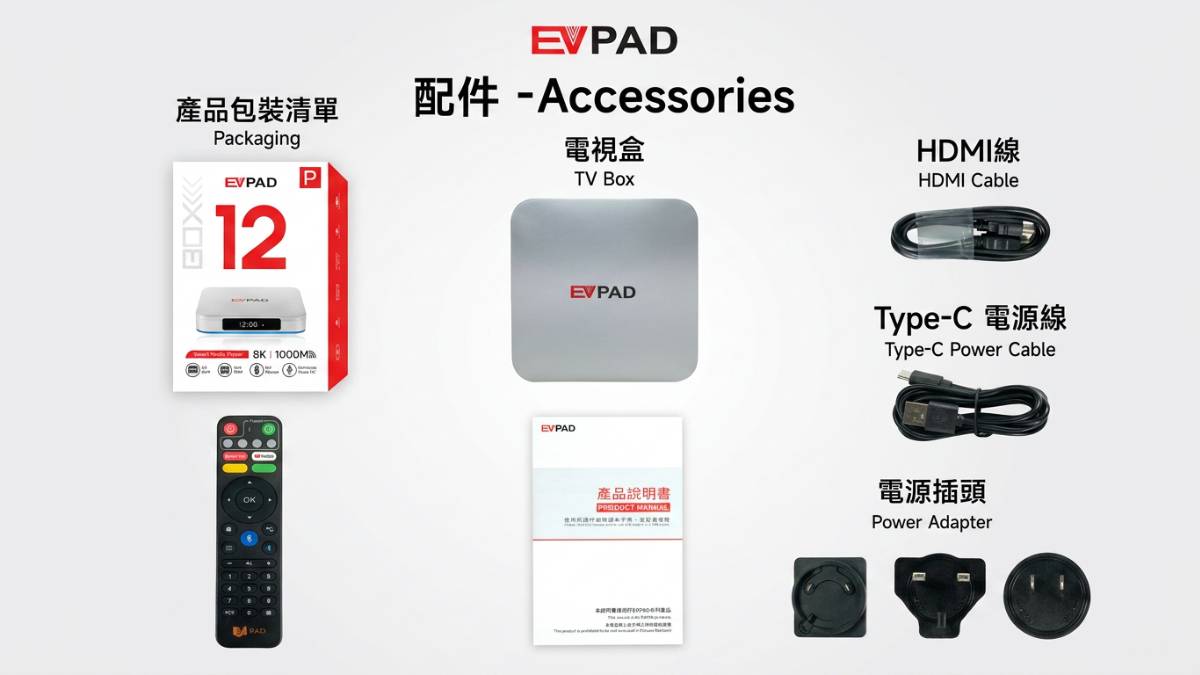
- Check the package: Confirm that the TV box, remote, power adapter, HDMI cable and listed accessories are present.
- Connect HDMI: Connect the EVPAD 12P to an available HDMI input on the television.
- Connect power: Use the correct supplied adapter and plug type.
- Select the TV input: Switch the television to the HDMI input used by the box.
- Connect the network: Choose Wi-Fi in the network settings or connect an Ethernet cable.
- Check language and time: Confirm the interface language, time zone, date and time.
- Check display settings: Select an output setting supported by the television.
- Pair and test the remote: Confirm button, air-mouse and supported voice operation.
- Review system information: Note the model and current system details before making advanced changes.
If the television shows no picture, first check the power indicator, HDMI cable and selected television input. Avoid immediately performing a factory reset, because a reset can remove settings and installed applications. The EVPAD FAQ provides additional setup and troubleshooting guidance.
Compatible Apps and Third-Party Services
The EVPAD 12P is hardware that can run compatible applications and services. Availability can vary according to the application provider, device requirements, account status and country.
The hardware purchase and third-party services should be considered separately. Our store charges for the device itself. A third-party provider may require its own account, subscription or payment, and its terms may change independently.
Before relying on a particular service, verify its current device compatibility and regional availability through the provider's official information. Avoid unknown download sources and do not install files intended for a different EVPAD model.
What Comes in the Package?
The current product listing includes the EVPAD 12P TV box, voice remote, power adapter, HDMI cable and standard accessories. Promotional gifts may vary according to the offer and available stock.
After delivery, compare the parcel with your order confirmation. Keep the retail box, accessories and proof of purchase while you test the device, since they may be required for an eligible return or support request.
EVPAD 12P Strengths
- 4GB RAM and 64GB storage: A balanced hardware configuration for normal TV-box operation.
- Two network choices: Wi-Fi 6 and Gigabit Ethernet provide wireless and wired options.
- Simple television connection: HDMI makes the physical installation straightforward.
- Voice remote: Voice and air-mouse functions can make navigation more convenient.
- Compact design: The box can fit into most living-room arrangements without occupying much space.
- Multiple plug options: Buyers can select an appropriate plug when the option is available at checkout.
Limitations to Consider
- High-resolution output is not the whole experience: Picture quality still depends on the television, connection and source.
- Usable storage is lower than 64GB: System files occupy part of the advertised capacity.
- Wi-Fi performance varies: Walls, distance, interference and router quality affect wireless performance.
- Voice functions may require pairing: Batteries, pairing status and network condition can affect remote operation.
- Application availability is not universal: Compatibility, subscriptions and regional access are controlled by individual providers.
- Specifications can change: Buyers should check the live product page instead of relying only on an older review.
Who Is the EVPAD 12P Best For?
The EVPAD 12P may suit buyers who:
- Want an EVPAD model with 4GB RAM and 64GB storage
- Need both wireless and wired network options
- Prefer a voice remote for normal menu navigation
- Have a television with a compatible HDMI input
- Want a compact device for a living room or family television
- Are comfortable checking the requirements of their preferred applications separately
It may be less suitable for buyers who expect every third-party service to be included, need guaranteed compatibility with an unverified application, or want a device to replace a gaming computer or professional media workstation.
EVPAD 12P vs. Other EVPAD Models
Model selection should be based on hardware, memory, storage, remote type, network requirements and budget. Avoid choosing solely from a model name or an unverified content claim.
For example, the EVPAD 12P currently offers 4GB RAM, 64GB storage and a voice remote, while lower-spec configurations may have less memory or storage. Buyers comparing the 12P with the 12S can read the EVPAD 12P vs. 12S comparison before making a decision.
What to Check Before Ordering
- Confirm the model: Make sure the product page and cart both show EVPAD 12P.
- Select the correct plug: Choose US, UK, EU or AU according to your destination and outlet.
- Check television compatibility: Confirm that your television has a working HDMI input.
- Review network conditions: Decide whether you will use Wi-Fi or Ethernet.
- Check the live price: Promotions and currency display can change.
- Review package details: Confirm included accessories and any current promotional gifts.
- Read delivery terms: Processing time and delivery estimates depend on the destination and warehouse.
- Read return terms: Keep the original packaging and obtain approval before returning a product.
Shipping, Returns and Warranty
Orders are currently usually processed within 1–2 business days after payment confirmation. Supported local-warehouse orders for the United States, Canada and Japan are generally estimated to arrive within 2–5 business days after shipment. Delivery times are estimates and can be affected by warehouse availability, destination, customs, weather and carrier conditions.
The store currently provides a 30-day return-request period after delivery, subject to product condition and the full return terms. Contact support before sending anything back. Eligible orders also include 12-month warranty support for manufacturing faults.
Because policies can change, review the current Shipping Policy and Return and Refund Policy before checkout.
EVPAD 12P FAQ
Is the EVPAD 12P the same as the EVPAD 12?
Searchers sometimes use “EVPAD 12” as a shorter term, but buyers should confirm the exact model name on the product page and order confirmation. EVPAD 12P and other models can have different hardware configurations.
How much RAM and storage does the EVPAD 12P have?
The current EVPAD 12P configuration is listed with 4GB RAM and 64GB internal storage. Available storage after startup will be lower because the system uses part of the capacity.
Does the EVPAD 12P support Wi-Fi 6?
Yes. The current product listing includes Wi-Fi 6 support. Actual wireless speed and stability depend on the router, distance, interference and home internet connection.
Can I use an Ethernet cable?
Yes. EVPAD 12P includes a Gigabit Ethernet option for a wired network connection. Actual speed still depends on the router, cable and internet service.
Does the EVPAD 12P support 8K?
The current specification lists output up to 8K. Actual image quality depends on the television, HDMI connection, selected display settings and source material. The specification does not make lower-resolution content become 8K.
Does the hardware require a monthly fee?
The store charges a one-time purchase price for the EVPAD 12P hardware. Third-party apps and services may require separate accounts, subscriptions or payments according to the provider and region.
What should I do if the EVPAD 12P shows no signal?
Confirm that the device has power, the HDMI cable is connected correctly and the television is using the correct HDMI input. Try another compatible cable or HDMI port before changing advanced system settings.
Should I use Wi-Fi or Ethernet?
Use Ethernet when a cable is convenient or the Wi-Fi signal is unreliable. Wi-Fi is suitable when the router provides a stable signal near the television. Choose the option that performs more consistently in your home.
Where can I get setup assistance?
Start with the EVPAD Setup and Support Center. If the issue continues, contact support with your order number, exact model and a concise description of the problem.
Final Verdict
The EVPAD 12P offers a sensible hardware combination for buyers who prioritize memory, storage and flexible networking. Its 4GB RAM, 64GB storage, Wi-Fi 6, Gigabit Ethernet, HDMI connection and voice remote cover the main requirements of a modern home TV-box setup.
Its value depends on whether those features match your television, router and everyday needs. Buyers should verify the plug type, current package contents, shipping terms and third-party service requirements before ordering rather than making a decision from resolution numbers or unsupported content claims alone.
View the current EVPAD 12P specifications and ordering options
Product specifications, stock, promotions, delivery estimates and support terms may change. Review the current product and policy pages before purchasing.