
Quick summary: The best TV box for a Chinese-speaking family is not simply the device with the largest specification numbers. A better buying decision considers language usability, network connection, memory and storage, remote control, TV compatibility, setup difficulty and after-sales support.
This guide explains the practical points to compare before ordering a TV box in 2026, especially for households where parents, grandparents or other family members may prefer a simple and familiar setup.
What Should Chinese-Speaking Families Compare?
Different households use a TV box in different ways. Some users care most about simple navigation, while others prioritize network stability, storage space or customer support.
Instead of choosing a device based only on marketing terms, compare the features that affect everyday use.
1. Chinese-Language Usability
Language support can be especially important when a TV box is shared by several generations in the same household.
Before purchasing, check whether the device offers the language options your family needs and whether commonly used system menus are easy to understand.
- Check the available system languages.
- Review the layout of the main settings menu.
- Consider whether text size and navigation are comfortable for older users.
- Check whether the remote control is simple enough for everyday use.
The goal is not to find the device with the most features, but one that family members can operate without unnecessary complexity.
2. Wi-Fi and Ethernet Connection
Network hardware is another important buying factor. A TV box may connect through Wi-Fi, Ethernet or both.
Wi-Fi is convenient when the router is nearby and you want a clean setup without additional cables. Ethernet can be useful when the TV is far from the router, the wireless environment is crowded or you simply prefer a wired connection.
| Connection | Main Advantage | Good For |
|---|---|---|
| Wi-Fi | Simple installation with fewer cables | Living rooms with good router coverage |
| Wi-Fi 6 | Modern wireless standard for compatible networks | Homes already using a Wi-Fi 6 router |
| Ethernet | Stable wired network connection | Fixed TV installations and rooms with weak Wi-Fi |
3. Memory and Storage
RAM and internal storage influence how comfortable a TV box feels during daily operation.
More RAM can provide additional headroom for normal system operation and switching between functions, while additional storage gives the device more room for system data and compatible applications.
When comparing models, do not look at storage numbers alone. Also consider system stability, software maintenance and whether the device meets your family's actual needs.
4. Remote Control
The remote control is one of the most frequently used parts of a TV box. A good remote should make common actions easy without requiring users to remember complicated button combinations.
Consider:
- Button size and layout
- Navigation responsiveness
- Voice-control availability where supported
- Battery replacement
- Remote pairing and troubleshooting support
For households with older family members, a simple remote and clear navigation may matter more than additional advanced features.
5. TV and HDMI Compatibility
Most modern TV boxes connect to a television through HDMI. Before ordering, confirm that your TV has an available HDMI input and that the device package includes the accessories required for normal setup.
You should also check:
- HDMI connection
- Power adapter and plug type
- Supported display settings
- Available USB or storage ports if required
- Ethernet port availability if you prefer wired networking
EVPAD 12P as a Current Option
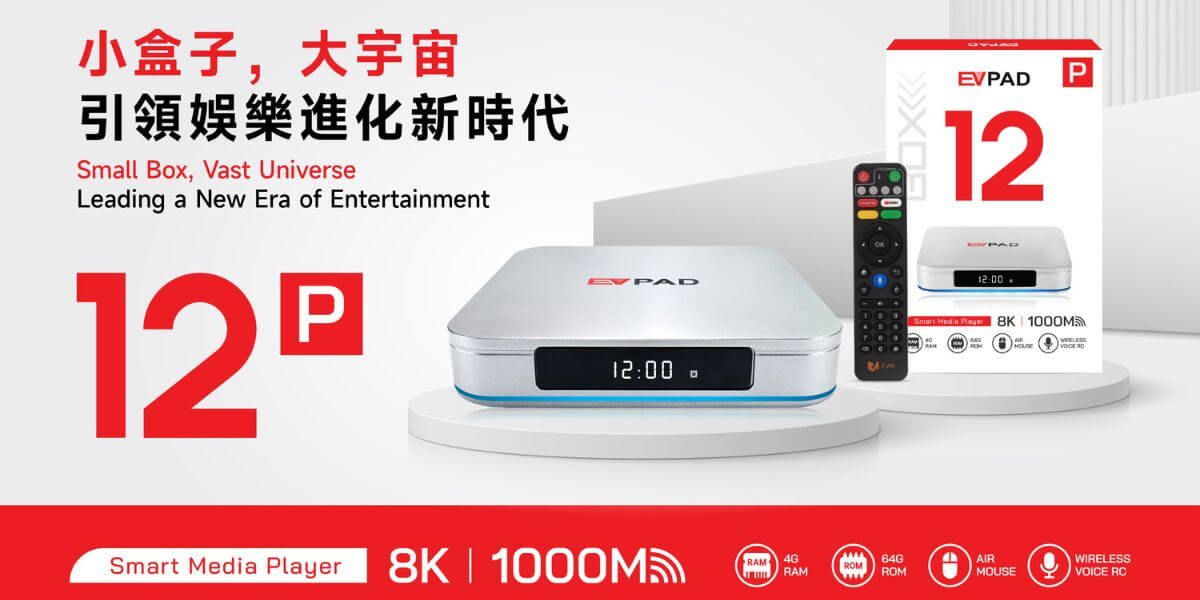
For buyers comparing current EVPAD models, the EVPAD 12P is one option to consider.
The current product information used for this guide lists several hardware features that are relevant to everyday home use:
| Feature | EVPAD 12P | Why It Matters |
|---|---|---|
| Memory | 4GB RAM | Provides more system headroom than entry-level configurations |
| Storage | 64GB | Offers additional space for normal device use |
| Wireless | Wi-Fi 6 | Useful with compatible modern routers |
| Wired Network | Gigabit Ethernet | Provides a wired network option |
| Remote | Voice Remote | Can make navigation more convenient for supported functions |
This does not mean one model is automatically right for every household. Buyers should still consider their television, router, preferred language, budget and support expectations before ordering.
Do You Need the Highest Specifications?
Not always.
A family TV box should first be reliable and easy to use. Paying more for specifications you do not need may not improve the everyday experience.
For example, a household primarily focused on simple living-room use may care more about:
- Stable network connection
- Clear menus
- Easy remote operation
- Reliable HDMI connection
- Good setup documentation
- Responsive customer support
Advanced users may have different priorities, such as additional ports, local storage devices or more detailed system controls.
Shipping, Returns and Support Matter Too
The device itself is only one part of the buying decision.
Before checkout, review the seller's current shipping, return and warranty information. This is particularly important for international orders because delivery times, warehouse availability and return procedures may vary by destination.
- Current product configuration
- Price and currency
- Plug type
- Shipping destination
- Estimated delivery information
- Return conditions
- Warranty information
- Customer-support contact details
You can review the store's shipping information, return policy and EVPAD FAQ before ordering.
Which Type of TV Box Is Right for Your Family?
Rather than trying to identify one universal winner, start with the needs of the people who will actually use the device.
| Your Priority | What to Look For |
|---|---|
| Parents or grandparents | Simple remote, clear menus and straightforward setup |
| Weak Wi-Fi area | Ethernet connection and suitable router placement |
| More storage | Higher internal storage capacity |
| Modern home network | Wi-Fi 6 compatibility and Ethernet option |
| International purchase | Plug compatibility, shipping, returns and responsive support |
| Simple daily use | Balanced hardware rather than unnecessary specifications |
TV Box Buying Checklist
- Confirm your TV connection. Check that an HDMI input is available.
- Review your network. Decide whether Wi-Fi or Ethernet is more suitable.
- Check memory and storage. Choose a configuration appropriate for long-term daily use.
- Review language options. Make sure the system is comfortable for the people using it.
- Check the remote. Simple operation can be especially important for family use.
- Confirm the plug type. International buyers should verify power compatibility.
- Read shipping and return terms. Do this before checkout rather than after an issue occurs.
- Verify support options. Make sure you know how to contact the seller if assistance is required.
Frequently Asked Questions
What is the best TV box for a Chinese-speaking family?
There is no single model that is best for every household. Compare language usability, memory, storage, Wi-Fi, Ethernet, remote control, TV compatibility, shipping and after-sales support before choosing.
Is 4GB RAM useful for a TV box?
Additional RAM can provide more headroom for normal system operation and everyday multitasking. The right amount depends on the device, software and how it will be used.
Should I use Wi-Fi or Ethernet?
Wi-Fi is convenient and works well when router coverage is strong. Ethernet is a useful alternative when you prefer a fixed wired connection or want to reduce wireless-network variables.
Is EVPAD 12P suitable for family use?
EVPAD 12P includes 4GB RAM, 64GB storage, Wi-Fi 6, Gigabit Ethernet and a voice remote according to the current product information used for this guide. Whether it suits your family depends on your TV, network, language preferences and budget.
What should I check before ordering internationally?
Confirm the product configuration, plug type, shipping destination, current delivery information, return conditions, warranty terms and available customer-support options before checkout.
Compare EVPAD 12P Before Ordering
Review the current EVPAD 12P product information, specifications and store policies before making your final decision.
View EVPAD 12P Read EVPAD FAQNeed help before ordering? Contact EVPAD Support.